
What Are AI Digital Humans? How Conversational AI Avatars Transform Customer and Employee Experiences
Key Takeaways
- AI digital humans combine conversational AI with a real-time visual interface. Their effectiveness depends on how well language models, speech processing, facial animation, and rendering work together.
- Low latency and accurate lip-sync are essential for natural conversations. Even strong AI responses can feel ineffective when pauses or visual mismatches disrupt the interaction.
- The strongest use cases are repetitive, high-volume interactions where users need guidance. Examples include customer service, hospitality, financial onboarding, healthcare intake, and employee training.
- Successful deployments require more than a realistic avatar. Reliable knowledge sources, clear disclosure, privacy controls, human handoffs, and measurable pilot goals are equally important.
An AI digital human is a conversational system with a rendered face.
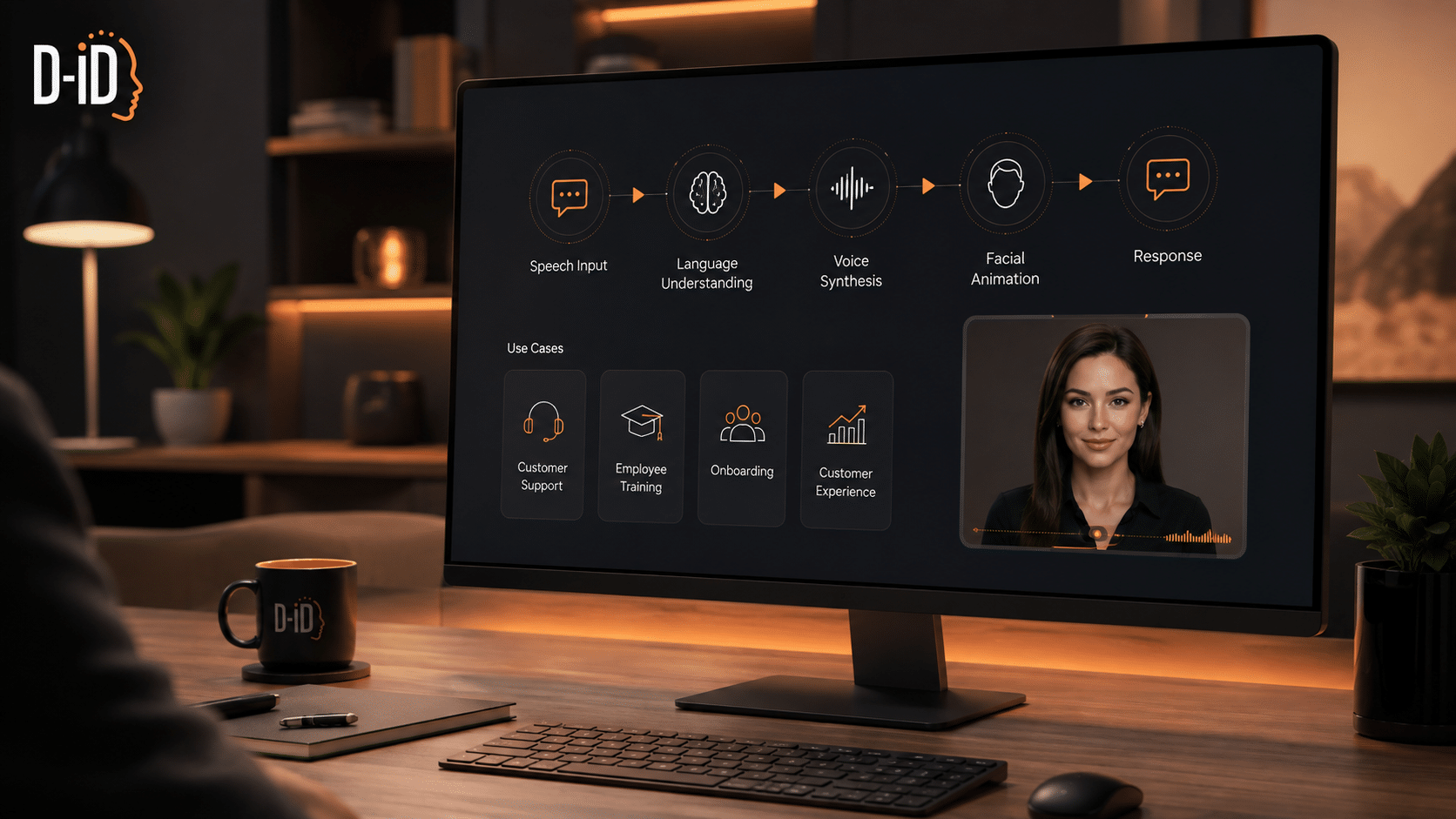
Someone speaks to it, and four things happen in sequence:
- Speech recognition turns the audio into text
- A language model generates an appropriate response
- Speech synthesis turns that answer into audio
- A graphics pipeline animates a face so the mouth shapes match the sound coming out of it.
All of that has to be completed before the person waiting starts to wonder whether they were heard.
That last constraint is what separates this from a chatbot with a picture attached. A chat interface can take two seconds to respond and nobody minds, because the visual language of a typing indicator has trained everyone to wait.
A face cannot do that.
The challenge is therefore to coordinate multiple subsystems, each introducing its own latency, closely enough that the interaction still feels natural.
What a Digital Human Is Made Of
It helps to think of a digital human as several interconnected layers. Each has different technical requirements, cost drivers, and potential points of failure.
The language layer
A large language model handles the open-ended part of the conversation, the questions that were never anticipated and cannot be scripted.
Alongside it sit smaller task-specific models doing narrower jobs: checking an answer against policy before it is spoken, pulling out an order number or a date from what the customer said, and recognizing when someone has asked to speak to a person so the system can hand off rather than keep trying.
This layer has become close to interchangeable. While model choice still matters, deployment success often depends just as much on the quality of the underlying data, integrations, and conversation design.
What determines it is what the model is reading from.
Many enterprise digital humans use retrieval systems to ground responses in an organization’s own knowledge base.
If a hotel concierge avatar states a cancellation policy that changed last quarter, the model performed correctly. It read the page it was given and summarized it accurately.
Teams that respond to that failure by evaluating a different model will spend weeks and see no improvement, because the work is in auditing and dating the source documents, deciding who owns each one, and building a process for updating them when a policy changes.
The face
This is where the visual work happens: rendering the head in real time, rigging the facial muscles so expressions are possible, and mapping speech sounds to mouth shapes so the lips match the audio.
Frameworks like Epic’s MetaHuman have made the modeling part accessible to teams with no character artists on staff, which has pushed a lot of projects toward photorealism by default.
That default is worth questioning, because realism raises the accuracy requirement rather than lowering it.
Even a small timing mismatch between speech and lip movement can affect how natural the avatar feels:
- Minor imperfections may be less noticeable on a stylized avatar. With a photorealistic avatar, the same mismatch can be much more distracting.
- On a photoreal avatar, the same error reads as a human face doing something human faces do not do, and testers consistently describe it as unsettling without being able to say what was wrong.
The more convincing the face, the more precisely everything behind it has to be timed.
The practical consequence is a fork in the budget.
A photoreal deployment needs a much longer animation and QA cycle to hit that tolerance, or it needs the realism stepped down a level so the tolerance loosens. The second option can reduce both rendering costs and production time while making minor imperfections less noticeable.
The latency budget
Every stage costs time: capture, transcription, retrieval, generation, synthesis, phoneme mapping, render.
Individually, these are tens or low hundreds of milliseconds, but on a modest device they add up past a second.
Even relatively short pauses can make spoken interactions feel unnatural, particularly when users are expecting an immediate conversational response. Past that, people assume they were not heard and repeat themselves, which forces the system to abandon the answer it was already producing, so the second wait feels longer than the first.
Three techniques buy that time back, and most deployments need all three.
Streaming starts the first clause while the rest of the answer generates. Caching serves the forty most common questions without touching the model. Filler motion, a head turn or an intake of breath, covers roughly 400 milliseconds, because a face visibly preparing to answer does not read as a face that failed to hear.
Data handling
Digital humans may process sensitive data such as names, purchase histories, billing information, or clinical details. Camera-enabled systems may also process facial data, which can be subject to additional privacy requirements.
Setting retention windows and access controls before launch is a short conversation. Setting them after a lobby kiosk has been recording video for four months is a legal exercise with an unpredictable outcome, and it has killed pilots that were working on every other measure.
Where They Pay Off
The use cases that survive are high volume, highly repetitive, and currently handled by something that makes people wait.
Retail and hospitality
The advantage over a touchscreen is that a conversational system can absorb a badly formed question.
“The one my mother has, but quieter” is a completely ordinary thing to say in an appliance store and an impossible input for a dropdown menu. An avatar can ask a clarifying question, narrow to two models, check warehouse stock, and point the person toward the right aisle.
Hotels can also benefit from automating check-in support and frequently repeated questions about amenities, transportation, and dining.
The feature that carries disproportionate weight here is language switching, specifically the ability to move into a guest’s language mid-conversation without them selecting it from a menu. A guest who has to hunt for a flag icon usually gives up and waits for the desk.
Financial onboarding
Opening an account involves identity verification, source of funds declarations, risk questionnaires, and disclosures that have to be displayed and acknowledged in a specific order.
Document-upload and identity-verification steps can be significant points of friction during onboarding.
The reason is almost always the same: the rejection message says the image could not be read, without telling the customer that the glare across the top third is the problem, so they retake the same photograph in the same lighting and fail again.
Gregor Emmian, Deputy Chief Digital Growth Officer at Rise, which builds trading and investment infrastructure for retail and institutional clients, has spent years tracking where financial onboarding leaks users.
He says, “In finance, most drop-off happens at the moments where a customer does not know what is expected of them. A digital human that explains a verification step in plain language, in the customer’s own language, and waits while they find the document, recovers accounts that a static form would have lost.
What matters is not the novelty of the face. It is that someone is finally answering the question the form could not.”
Healthcare intake
There is more published evidence here than anywhere else, with reviewed studies supporting conversational agents in triage and chronic disease management when they operate under clinical supervision. The World Health Organization’s Florence has run tobacco cessation and public health guidance at scale.
The design discipline required is different from commercial work, and it comes down to scope. The avatar collects symptoms, explains what a procedure involves, and translates the terminology on a discharge sheet into language the patient can act on.
It does not reassure, and it does not soften a number, because a patient who hears conversational warmth and reads it as clinical reassurance has been misled by the interface rather than by anything the system actually said.
That is a design failure, and no amount of visual polish corrects it after the fact.
Training People Inside the Company
Onboarding degrades in most organizations for a structural reason: it is delivered by whichever experienced person had a free hour that week.
Two people hired on the same Monday receive materially different introductions to the same job, and the difference does not surface until one of them is struggling six months later, at which point it is read as a hiring problem rather than a training one.
An avatar delivering enrollment walkthroughs and scenario practice removes that inconsistency, and it adds something a human trainer cannot easily provide, which is unlimited repetition without an audience.
This isn’t a new idea. It’s the same reason routine correspondence gets delegated in the first place. An email management virtual assistant earns its place for the same reason an avatar does here: the work is high-volume, pattern-based, and doesn’t improve by being handled inconsistently by whoever has a spare hour.
A sales rep can rehearse the pricing objection they keep fumbling twenty times in an afternoon. A support agent can practice the escalation script against a difficult customer that does not get tired and does not remember the previous attempt.
The condition attached is consent. Employees should be told they are talking to a system and told what happens to the recording, because practice sessions harvested as training data will end the program the moment anyone finds out.
Disclosure, Provenance, and Bias
A system with a face and a voice receives the kind of trust people extend to other people.
That response is the entire reason the format works, and it is why the disclosure question has moved out of the ethics discussion and into regulation.
The EU AI Act sets transparency and oversight obligations tiered by risk, the NIST AI Risk Management Framework gives implementation teams a concrete structure to govern against, and provenance standards like C2PA allow synthetic media to carry a verifiable record of what generated it and when.
Rawad Baroud, CEO of ZeroGPT, an AI detection platform used by educators, publishers, and enterprises to identify machine-generated text, has watched disclosure shift from a niche compliance item to a baseline expectation.
He says, “The moment a synthetic voice and face become indistinguishable from a person, disclosure stops being a courtesy and becomes infrastructure. Organizations need to know what was generated, by which system, and when, and they need to be able to prove it later.
The companies treating detection and provenance as an afterthought are building on ground that is going to move under them.”
In practice, disclosure works best spoken in the opening seconds rather than printed somewhere in the interface, because a footer satisfies a lawyer and a sentence satisfies the customer.
Bias is the harder problem, because it does not announce itself. Speech recognition trained on a narrow distribution of accents will make some customers repeat themselves three times before the system parses them, and those customers leave.
A knowledge base built from the questions existing customers ask will not contain the questions a different community would ask, so the avatar handles them poorly. Neither of these registers as an error in the logs. Both appear only as abandonment that looks like noise until someone segments it.
How to Run the Pilot
The pattern in failed pilots is consistent: scope too wide, success defined too loosely, and a demonstration built to satisfy the executive who approved the spend rather than the customer who has to use it.
The correction is to pick one workflow and attach one number to it.
David Kolodny, co-founder of Wilbur Labs, a startup studio that has built and scaled multiple companies from concept to market, has repeatedly seen founders overbuild before validating.
He says, “Take one narrow use case, put it in front of real users within weeks, and let their behaviour tell you what to build next. Teams that do that learn more in a month than teams that spend two quarters polishing a version nobody has stress-tested.”
Two things belong in the build before the avatar says anything.
The first is the escalation path, which has to be fast, obvious, and carry the transcript and account context across the handoff.
The second is instrumentation, and the single most useful signal to capture is where users stop speaking partway through a sentence. That hesitation predicts abandonment more reliably than any satisfaction survey, and almost nobody collects it.
What Determines Whether Any of This Sticks
Two shifts are underway that will change the economics.
Processing is moving on-device, which cuts latency by removing the round trip to a data centre and simultaneously improves the privacy position, since video that never leaves the kiosk is far easier to govern.
And spatial computing is moving avatars off screens and into rooms, where the interaction conventions have not been established yet: how far away a digital colleague should stand, what it should do when someone turns their back, whether it should occupy a chair.
What decides adoption is whether sub-second response and accurate lip-sync hold up on the mid-range tablet already bolted to the wall in the lobby, because that is the hardware most of these systems will actually run on.
Testing that on real hardware is cheaper than modelling it. D-ID lets teams stand up a working digital human against their own knowledge base and their own devices, which surfaces the timing and content problems in days rather than after a quarter of build.
Start with the one workflow that has a number attached to it, and let the response times on the tablet in the lobby decide the rest.

FAQs
-
An AI digital human is a conversational AI system represented by an animated or photorealistic face. It combines technologies such as speech recognition, language models, speech synthesis, and real-time facial animation to hold spoken conversations with users.
-
AI digital humans convert spoken input into text, generate an appropriate response with a language model, turn that response into speech, and animate a digital face to match the audio. These processes must happen quickly enough to maintain a natural conversation.
-
Common applications include customer service, hotel and retail assistance, financial onboarding, healthcare intake, and employee training. They are particularly useful for frequent, repetitive interactions where users benefit from conversational guidance instead of navigating static forms or menus.
-
Spoken conversations depend heavily on response speed. Speech recognition, retrieval, generation, voice synthesis, and rendering all add latency. If users wait too long after speaking, the interaction can feel unnatural and they may assume the system has not understood them.
-
Reliability depends on more than choosing a capable language model. Companies need accurate and regularly updated knowledge sources, fast system performance, appropriate data controls, clear escalation to human support, and testing on the devices users will actually interact with.
-
Clear disclosure is important because realistic faces and voices can encourage users to treat a system like a person. The article recommends making the AI nature of the interaction obvious and establishing appropriate transparency, provenance, and data-handling practices.
-
Start with one narrowly defined workflow and one measurable success metric. The pilot should also include a clear human escalation path and instrumentation that shows where users struggle, hesitate, or abandon the interaction before expanding into additional use cases.

Was this post useful?
Thank you for your feedback!