
AI video generator with realistic AI avatars
Create professional AI videos without cameras, actors, or complex production. Turn scripts and existing content into videos with realistic AI avatars, natural voices, and visual scenes you can customize to fit your message.
With D-ID's AI video generator, you can create, update, localize, and personalize video content in one place. Choose from expressive AI presenters, create in more than 120 languages and accents, and take video beyond one-way communication with Agentic Video.
Trusted by the world's leading companies












Benefits of the D-ID platform
Make every message feel more human
Go beyond a presenter simply reading a script. D-ID's expressive avatar technology can align facial expression, voice, and sentiment with the message for a more natural delivery.
Keep one digital presence across experiences
Use a consistent AI presenter across scripted videos and interactive experiences, creating a recognizable human face for communication instead of switching between disconnected formats.
Turn content into an ongoing experience
A video does not have to end when playback stops. With D-ID, existing video content can become the starting point for questions, clarification, and deeper interaction.
Match the experience to the audience
Adapt not only the language and content, but also the presenter, voice, tone, and level of interaction to different audiences and communication needs.
Get more life out of every video
Update, localize, personalize, or make existing content interactive instead of treating every finished video as a static asset that eventually needs to be replaced.
Bridge video creation and conversation
Use the same platform to create polished presenter-led content and build real-time visual AI experiences, connecting one-way communication with individual dialogue.
How does the D-ID AI video generator work?
D-ID Studio takes you from a template or blank canvas to a finished AI video in a few simple steps. Choose your presenter, add your message, customize each scene, and let D-ID generate the final video.
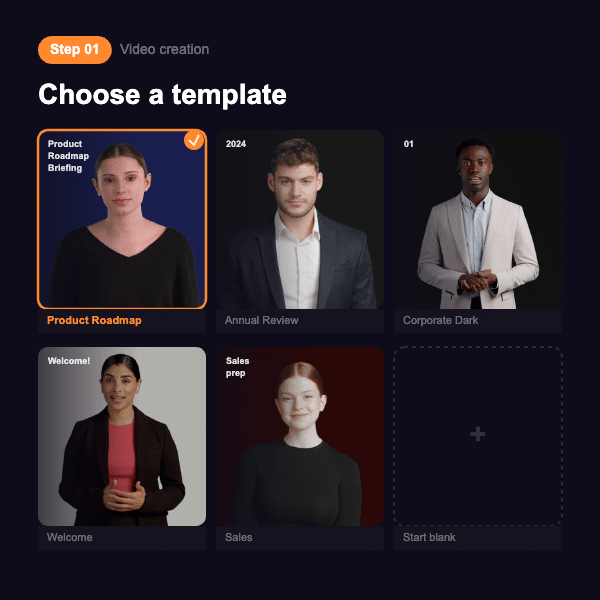
Choose a template or start from scratch
Start with a ready-made video template that fits your content, or choose a blank video if you want more control over the design.
Templates give you a starting structure while still allowing you to customize the presenter, voice, visuals, and individual scenes.
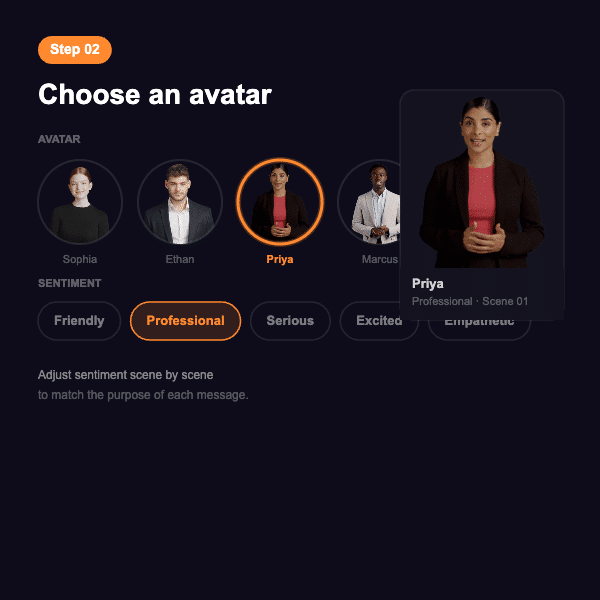
Choose your AI avatar
Select one of D-ID's realistic AI avatars that fits your topic, audience, and style.
Choose from stock presenters, use a Personal Avatar, or create a custom presenter for a recognizable presence across your videos.
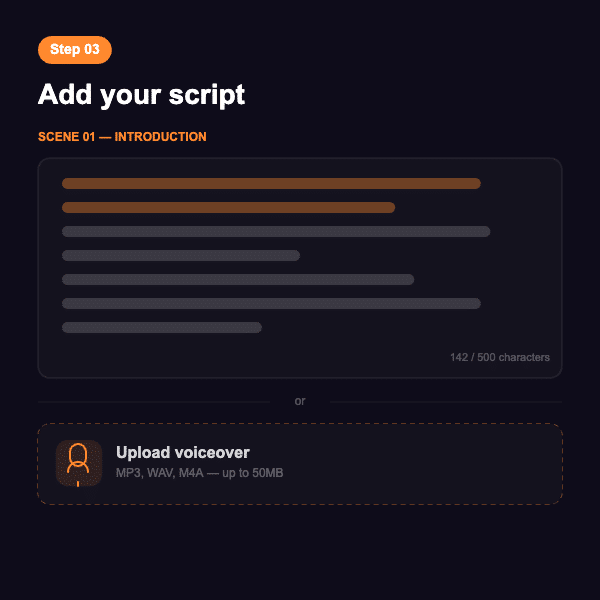
Add your script or audio
Type or paste your script directly into D-ID Studio, or upload a previously recorded audio file.
When you enter a script, choose from a wide selection of natural-sounding AI voices in different languages and accents. You can also use voice cloning when you want to maintain a consistent speaker identity.
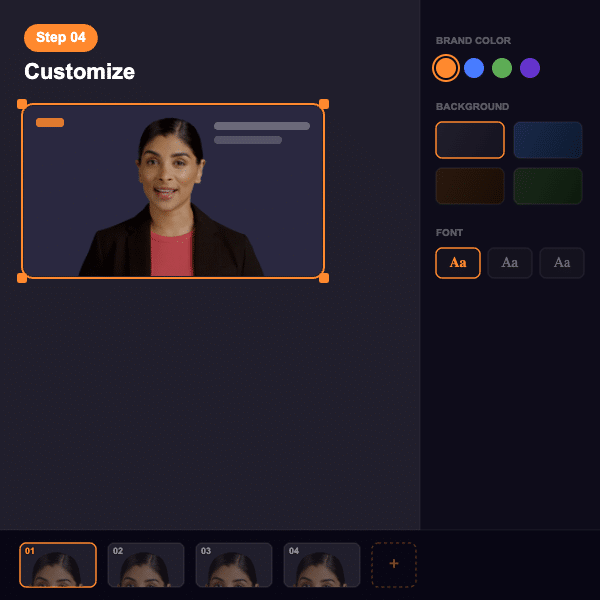
Customize your scenes
Adjust the background, add text and graphics, select additional visual assets, or upload your own images and media.
Build each scene around the information you want to communicate and adapt the visual presentation to your audience or brand.
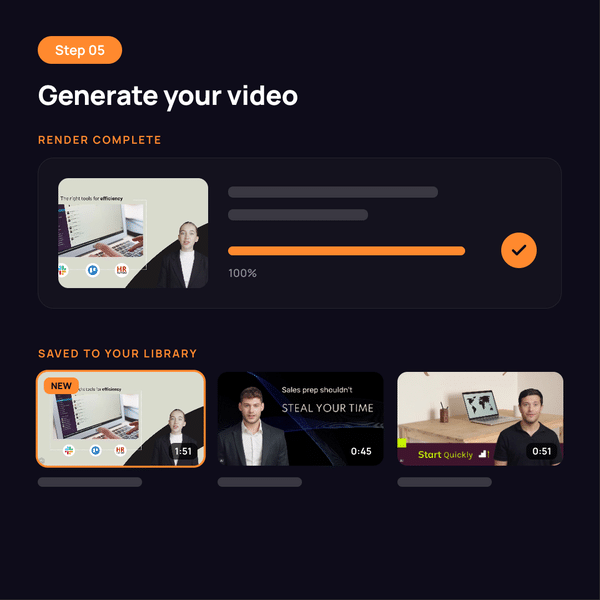
Generate your AI video
Once everything is ready, generate your video.
The finished AI video is saved to your video library, where you can access, manage, reuse, and create new versions whenever you need them.
Why create AI videos with D-ID?
Traditional video production makes every new version a new project. A changed script, another language, or a different audience can mean more recording, editing, and production work.
D-ID's AI video generator replaces much of that process with a flexible AI workflow.

Create with realistic AI presenters
Choose from a wide range of ready-to-use stock avatars, including D-ID's V4 Expressive Avatars for highly realistic, expressive delivery with natural facial movement and selectable sentiments.
For a more distinctive presence, create your own AI avatar using the workflow that fits your needs. D-ID supports custom avatar creation from a single image, a video recording, or a professionally produced setup for the highest level of quality and control.
Update without reshooting
Change your script, voice, presenter, language, background, or visual content and generate a new version without filming again.
Keep training, marketing, product, and communication videos current even when information changes frequently.
Reach audiences around the world
Create AI videos in more than 120 languages and accents while keeping the same presenter and core message.
Localize video content for different markets without asking speakers to record every language version themselves.
Go beyond one-way video
Most AI video generators stop when the video is finished. D-ID can turn that video into an interactive experience.
With Agentic Video, viewers can ask questions by voice or chat and receive relevant answers based on the video and connected knowledge.
Turn AI videos into conversations
Most AI video generators create a finished video. The viewer watches it, and the experience ends.
D-ID can take AI video a step further with Agentic Video.
What if viewers could ask your video a question?
Agentic Video combines video content with a real-time visual AI agent. During or after the video, viewers can ask questions by voice or chat and receive answers based on the video and connected knowledge.
This can be useful when:
- A learner wants another explanation before continuing
- A prospect has a question about a product or service
- A customer needs help with a step in a tutorial
- An employee wants clarification about a process or policy
Instead of creating another video for every possible question, the original video becomes the starting point for a two-way experience.
AI video creation for the way you work
Use D-ID's AI video generator for recurring communication across learning, marketing, sales, support, and internal teams.

Learning and development
Turn training materials, presentations, policies, and existing learning content into engaging AI videos with realistic digital presenters.
Create onboarding, compliance, skills training, and knowledge-sharing videos that are easy to update and localize for different teams and regions. With Agentic Video, learners can also ask questions, request clarification, and get additional explanations as they learn.

Marketing
Create AI videos for campaigns, product launches, social content, explainers, and personalized outreach without organizing a new production for every asset.
Adapt messaging, presenters, languages, and visuals for different audiences, channels, and markets. For more interactive campaigns and product experiences, Agentic Video can give viewers the option to ask questions directly within the video.

Sales
Give sales teams presenter-led videos for prospecting, product explanations, follow-ups, and sales enablement.
Create different versions for industries, buyer roles, or stages of the sales process. Agentic Video can take product and sales content further by answering prospect questions and providing more detail based on what each viewer wants to know.

Product education and customer support
Turn help articles, FAQs, tutorials, and product documentation into visual content that guides customers through products and processes.
With Agentic Video, customers can ask follow-up questions, clarify individual steps, and get relevant answers within the same experience instead of searching for additional support content.

Internal communications
Create AI videos for company updates, process changes, announcements, and internal knowledge sharing.
Reuse a consistent presenter and create additional language versions without asking the original speaker to record every version. For more complex topics, Agentic Video can also help employees clarify policies, processes, or company information.
One AI video platform, multiple ways to create
Different video workflows need different tools. D-ID lets individuals, teams, and developers create AI video in the way that fits their workflow.
D-ID Studio
Create and edit AI videos through an easy-to-use visual interface. Choose your presenter, add a script and voice, customize the scene, and generate your video.
AI video API
Add AI video generation directly to websites, applications, platforms, and automated workflows. Generate videos programmatically instead of creating every video manually.
Integrations
Bring AI video creation into tools you already use, including Canva, PowerPoint, learning platforms, and other content workflows.
Personalized video campaigns
Create personalized AI video messages for marketing and sales campaigns using dynamic information for different recipients.
Built for business
AI video creation becomes more valuable when teams can use it repeatedly and confidently.
D-ID combines accessible video creation with the infrastructure, controls, and integration options businesses need to expand AI video across different workflows.
Scalability
Create, update, and localize large volumes of video without repeating production.
Security
Protect company content and user data with enterprise-grade controls.
Integration
Connect video creation with existing platforms, systems, and automated workflows.
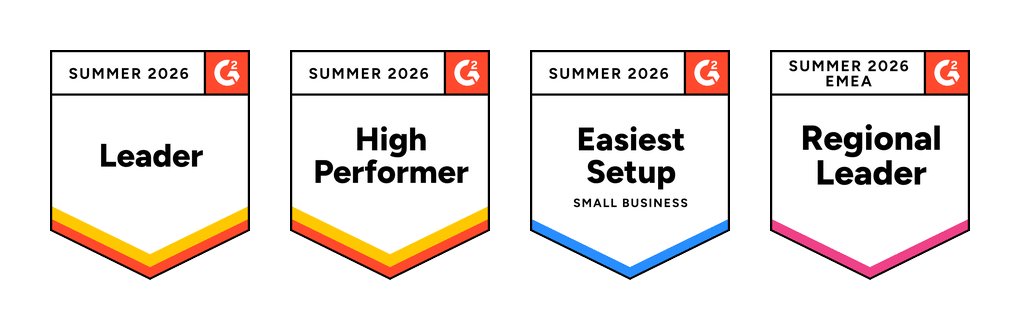
Rated 4.6 out of 5 on G2

Frequently Asked Questions
What is an AI video generator?
An AI video generator is software that uses artificial intelligence to create video without a traditional filming process. D-ID combines realistic AI avatars, natural voices, visual scenes, localization, and interactive video to create professional presenter-led content through an online Studio or API.
How do I create an AI video with D-ID?
Choose a template or blank video, select an AI avatar, and add your script or recorded audio. You can then customize backgrounds, text, graphics, and other media before generating the finished video and saving it to your D-ID video library.
What makes D-ID different from other AI video generators?
D-ID combines traditional AI video generation with expressive AI avatars and interactive Agentic Video. Teams can create presenter-led videos and then turn selected content into experiences where viewers can ask questions by voice or chat and receive relevant answers.
Can I create my own AI avatar?
Yes. D-ID offers ready-made presenters as well as personal and custom avatar options. Depending on the avatar type, you can create a reusable digital presenter and use it across different videos, languages, campaigns, and communication workflows.
What are D-ID V4 Expressive Avatars?
V4 Expressive Avatars are D-ID's latest generation of AI presenters designed for more natural and expressive delivery. Creators can use different sentiments to influence how the avatar presents a message, helping the performance better match the content and context.
Which languages does D-ID's AI video generator support?
D-ID supports more than 120 languages and accents, allowing teams to create localized AI videos for audiences in different countries while keeping the presenter, visual format, and core message consistent across versions.
Can I translate an existing video with D-ID?
Yes. D-ID can translate existing video into different languages while helping preserve the original speaker's voice and visual identity. AI-powered voice cloning and lip-sync make it possible to create localized versions without asking the original speaker to record again.
Can viewers interact with a D-ID AI video?
Yes. D-ID Agentic Videos allow viewers to ask questions by voice or chat during or after a video. A visual AI agent can respond using the video content and connected knowledge, turning a one-way video into a two-way experience.
Can developers integrate D-ID's AI video generator into other software?
Yes. The D-ID API can add AI video generation to websites, applications, platforms, and automated workflows. Developers can trigger video creation programmatically and connect D-ID with existing systems rather than creating every video manually in Studio.
Is D-ID AI video software for business?
Yes. D-ID's AI video software supports business use cases including learning and development, marketing, sales, product education, customer support, and internal communications. Teams can create directly in Studio, while developers can automate creation through the API.
Create your first AI video
Turn your next script, presentation, document, or idea into a professional video with an AI presenter.
Create it once. Update it when you need to. Translate it for new audiences. Or turn it into an interactive experience that can answer questions.